


Choosing a home alarm quickly turns into a headache: dozens of brands, conflicting promises, murky monthly fees. I've been through it myself, and more importantly I've guided hundreds of households through this decision.
Over fifteen years, I've installed, tested and assessed a huge number of systems — from the $80 kit to professional-grade setups. My takeaway is simple: the best alarm isn't the most expensive one; it's the one that fits your home, your budget and your lifestyle.
This guide gets straight to the point. You'll find my top 3 by profile, how it all works, how to choose without getting burned, real-world prices and the mistakes to avoid. And if you're in a hurry, start with the quiz below.
Which home alarm is right for you?
Answer these 5 questions: the quiz points you to the alarm profile that fits best, then to the right product in our top 3.
Find your ideal alarm
5 questions, 1 minute. No sign-up.
1. You live in…
2. You are…
3. Your budget for the equipment?
4. Do you want professional monitoring (24/7 response)?
5. Do you have reliable home internet?
Our top 3 home alarms by profile
No time to compare ten models? Here are the three picks that cover the vast majority of situations, tested and rated by our editorial team.
SimpliSafe
- ✅ Outstanding reliability and easy DIY setup
- ✅ Optional 24/7 monitoring with no contract
- ⚠️ Premium pricing on larger kits
Ring Alarm Pro
- ✅ Excellent value for the money
- ✅ Built-in LTE backup, no required monthly fee
- ⚠️ Tied to the Amazon ecosystem (data)
Abode Smart Security Kit
- ✅ Installs with no construction, 100% removable
- ✅ Deep smart-home integration (Alexa, Google, HomeKit)
- ⚠️ Some features need a paid plan
Why install a home alarm?
An alarm doesn't physically stop a burglar. It works differently, and it's just as effective: it deters, detects and alerts.
The opportunistic burglar — the vast majority of cases — is looking for a quiet, fast target. A blaring siren and an alerted neighborhood turn an easy "job" into a real risk. They'd rather walk away.
According to the FBI and the Bureau of Justice Statistics, there are roughly 2.5 million burglaries a year in the US. Cutting that risk at home starts with deterrence.
Deter
A visible alarm (siren, sticker) makes most intruders back off before they break in.
Detect
Sensors pick up an opening or movement the moment an attempt begins.
Alert
Siren, phone notification, even a dispatched response: the reaction is immediate.
How does a home alarm work?
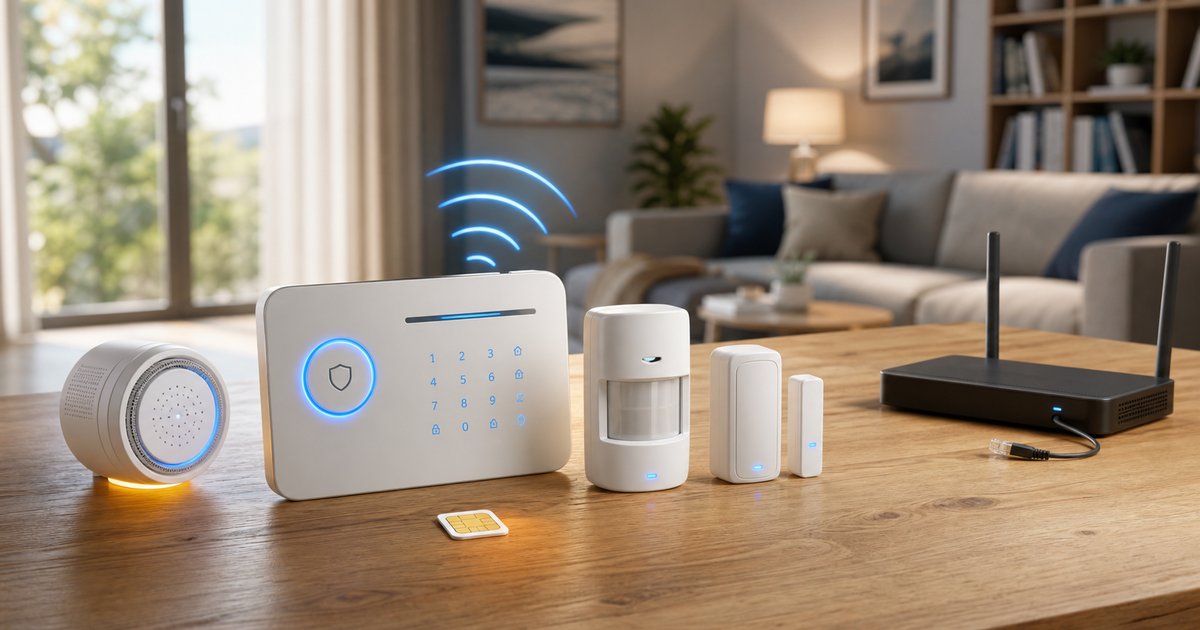
The principle is simple. A base station (the brain) receives signals from sensors placed around the home, and triggers a response if one of them detects something while the system is armed.
The typical cycle has a few steps: arming as you leave, an exit delay, active monitoring, detection, a short entry delay to disarm, then the trigger if nothing stops it.
The essential components
Base station
The brain. Receives the sensors, triggers the siren and the alerts. A backup battery is a must.
Siren
Indoor (90-110 dB) and/or outdoor (105-120 dB). Deters and alerts the neighborhood.
Motion sensor
Infrared (PIR), 30-50 ft range. Pet-immune versions help avoid false alarms.
Entry sensor
Magnetic sensor on doors and windows. Alerts the instant they start to open.
Arming
Keypad code, key fob or app to arm/disarm the system.
Cellular (LTE) module
Remote alerts even if your internet is down. The backup path that makes the difference.
The different types of alarms
Before comparing models, you need to understand the main families. Three distinctions matter: the connection type, the communication path and the monitoring approach.
Hardwired or wireless?
✅ Wireless (recommended)
- Installs in a few hours, no construction
- Flexible, expandable, ideal for remodels and rentals
- Just as reliable on modern models
⚠️ Hardwired
- Very reliable, no batteries to replace
- But requires wiring, install costs, little flexibility
- Mostly reserved for new construction
For the vast majority of existing homes, I recommend modern wireless: it's the best balance of simplicity, performance and expandability.
Which communication path?
This is a decisive criterion that's too often overlooked. A Wi-Fi-only alarm goes silent if the router is unplugged. A backup cellular (LTE) path guarantees the alert even during an outage.
If you're in an area with poor coverage or no internet, a fully standalone alarm (cellular or local RF) is still the right answer.
Complete guide: the alarm with no Wi-Fi or internet Cellular, local RF, hybrid: standalone solutions for dead zones or network outages.With or without monitoring: which to choose?
This is the question that comes up on every project. Two approaches, two philosophies.
With self-monitoring (no monthly fee), you receive the alerts and decide how to respond: check the camera, call a neighbor, call 911. Free, independent, and enough for most responsive households.
With professional monitoring (a monthly fee), a central station receives alerts 24/7, verifies the alarm and dispatches a response per protocol.
✅ No monthly fee (self-monitoring)
- No monthly cost, no commitment
- Full control, real-time alerts
- Ideal if you're reachable and responsive
⚠️ With professional monitoring (subscription)
- Alarm verification and dispatch even while you sleep
- Reassuring for a second home or long absence
- Recurring monthly cost ($20-$60/month)
How to choose your home alarm?
Instead of starting with the product, start with your situation. Four criteria are enough to frame the right choice.
1. The type of home
Apartment: a compact kit (door + 1-2 exposed windows + 1 motion sensor) is often enough. House: add the back entrances, the garage and an outdoor siren. Large property: multi-zone coverage and outdoor detection.
2. The budget
Entry-level $150-$400 (apartment), mid-range $400-$1,000 (house), premium beyond that. DIY setup removes the install cost, often $150-$400.
3. Certifications
For reliability and insurance, favor a UL-listed system that meets recognized standards (UL 681 / UL 827). It's a mark of performance that insurers recognize.
4. Network independence
Insist on a backup battery and a cellular (LTE) path. They're what prevent the system from being disabled by cutting the power or the internet.
Detailed comparison of the best alarms of 2026
Here's an overview of the systems I recommend, by use case and budget.
| System | Rating | Price | Monitoring | Best for |
|---|---|---|---|---|
| SimpliSafe | ★★★★★ 4.9 | ~$280 | Optional | Houses, max protection |
| Abode Smart Security Kit | ★★★★★ 4.8 | Optional | Smart home, renters | |
| Ring Alarm Pro | ★★★★☆ 4.6 | ~$250 | Not required | Best value, LTE backup |
| Eufy Security Alarm Kit | ★★★★☆ 4.5 | ~$200 | Optional | No monthly fee, local storage |
| Wyze Home Monitoring | ★★★★☆ 4.2 | ~$100 | Low-cost plan | Tight budget, second home |
Home alarm pricing and budget
The price depends on the number of components and the tier. Here are realistic benchmarks, excluding professional monitoring.
| Tier | Equipment | Installation | Up-front total |
|---|---|---|---|
| Basic wireless | $150-$400 | $0 (DIY) | $150-$400 |
| Mid-range | $400-$1,000 | $0-$200 | $400-$1,200 |
| Premium | $1,000-$2,000 | $200-$500 | $1,200-$2,500 |
| Professional | $2,000-$5,000 | $500-$1,500 | $2,500-$6,500 |
On top of that, if you choose it, professional monitoring ($20-$60/month) and, for cellular alarms, a small monthly cellular fee.
Installation and sensor placement
A well-placed alarm beats an expensive one mounted in the wrong spots. Sensor placement determines its real-world effectiveness.
The strategic spots (the home "layout")
Entry points
Entry sensors on the front door, the back/side door, the sliding patio door and the accessible ground-floor windows.
Walkways
Motion sensors in the entry hall, the central hallway and the living area: any intruder has to pass through.
Outdoor siren
On the facade, more than 10 ft up, visible from the street. The ultimate deterrent.
Base station
Sheltered, out of sight and away from the front door (targeted first), near an outlet and the router.
DIY or professional?
Wireless kits install yourself in 2-3 hours. A pro makes sense for hardwired systems, deep smart-home integration, or if you'd rather hand it off.
Regulations, standards and insurance
Good news: installing an alarm in your own home is free to do and needs no special authorization. That said, many US cities require you to register your alarm system with the police and charge fines for repeated false alarms — check your city's rules.
On quality, the key benchmark is a UL-listed system (UL 681 / UL 827). A listed system reassures your insurer and often qualifies you for a premium discount.
If your alarm includes cameras, follow common-sense privacy practices and applicable FTC privacy guidance: only record your own property, never the public street or your neighbors.
Common mistakes to avoid
- Hiding the alarm instead of making it visible: you lose most of the deterrent effect.
- Betting everything on Wi-Fi with no battery or cellular: it can be disabled in one move.
- Under-covering the back entrances and the garage, which are the real entry points.
- Ignoring the batteries: a dead sensor is a blind sensor.
- Buying an over-engineered system you never arm because it's too complicated.
- Forgetting physical security: the alarm alerts, but a solid door buys the decisive minutes.
They installed an alarm: real-world stories
The accounts below are composite stories, built from situations we frequently see in the field. The names are made up, but the scenes — and the lessons — are very real.
Sandra: "The siren was enough"
Sandra had been on the fence for months, convinced she needed some sky-high-priced system. She finally set up a wireless kit with a visible outdoor siren.
"One night, the alarm went off. By the time I checked the app, they were already gone — the siren scared them off in seconds. Nothing was taken."
Her takeaway: audible deterrence alone often does the job. No need to wait for the perfect system to protect yourself.
Mark: "Without the cellular backup, I'd never have known"
Mark had a Wi-Fi-connected alarm. During an attempt, the intruders cut the power at the panel.
"My base station had a backup battery and a cellular connection. It switched to the mobile network and sent me the alert while the internet was dead. That one detail changed everything."
His lesson: insist on a backup battery and a cellular path. That's what separates a real alarm from a gadget.
In short: my expert advice
After fifteen years equipping homes, here's what I'd tell a friend who asks for advice — no spin.
Always start with deterrence: a visible wireless alarm, with an outdoor siren, a backup battery and a cellular path. That's already 80% of the result.
Then choose based on your profile:
- Apartment / rental: a simple, removable no-monthly-fee kit (like Ring or Abode) is plenty.
- House: a more complete, expandable system (like SimpliSafe), with the back entrances and garage covered.
- Remote area / second home: prioritize cellular independence, and consider professional monitoring.
And above all: don't chase the perfect system. The best alarm is the one you actually install and arm every day. A simple kit set up this weekend beats an over-engineered one still in its box.
— Patrick Cheroux, residential security expert
Frequently Asked Questions about home alarms
Yes, as long as it's visible. Its main job is deterrence: a siren, a window sticker and a visible base station make the vast majority of opportunistic burglars give up, since they're looking for a quiet, fast target. A home with a visible alarm is far less likely to be targeted than one with no protection.
For most responsive households, a self-monitored alarm (no monthly fee) is enough: you get alerts on your phone and decide how to react. Professional monitoring (about $20-$60/month) adds alarm verification and 24/7 response, which is useful for second homes, long absences, or anyone who wants to hand it all off.
Yes. Modern wireless alarms, encrypted and with dual communication paths, are just as reliable for residential use. The only catch is replacing batteries every 2 to 4 years, which the app flags in advance. Wireless installs with no construction work, which makes it ideal for renovations and rentals.
A quality alarm has a backup battery (24 to 72 hours) and switches to a cellular (LTE) path if your internet goes down. Check both of these before buying: that's exactly what stops a burglar from disabling the system by cutting the power or the router.
On average, plan for: 1 base station, 1 outdoor siren, 4 to 6 entry (door/window) sensors on access points, 2 to 3 motion sensors in main walkways, and a way to arm it (keypad, key fob or app). That's a kit of roughly 8 to 12 components, adjustable to your layout.
Yes, for nearly all consumer wireless kits, which are designed for DIY setup in 2 to 3 hours, no special skills required. A pro makes sense for hardwired installs, deep smart-home integration, or if you'd rather hand off the setup and mounting.
Often, yes. Many insurers offer a discount (typically 5 to 20%) for a monitored system, and some may require one above a certain coverage amount. Favor a UL-listed system that meets recognized standards, ask your insurer which equipment qualifies, and keep the receipt.
A solid wireless kit starts around $150-$400 for an apartment, $400-$1,000 for a well-covered house, and more for premium or professional systems. DIY setup removes the install cost. Professional monitoring, if you choose it, adds a monthly fee.
Still undecided? Let us guide you
Retake the 1-minute quiz, or compare all the tested models in detail.
Related articles
To dig deeper based on your situation, these guides complement this home alarm comparison.



Sources and references
- FBI Uniform Crime Reporting (UCR) — Burglary statistics.
- FTC — Privacy and security guidance (cameras integrated with the alarm).
- UL-listed systems (UL 681 / UL 827) — performance standards for alarm systems.
